- Published on
AI Agents: From Concepts to Production
- Authors

- Name
- Jared Chung
Introduction
AI agents represent the next evolution of LLM applications. Unlike simple chatbots that respond to single queries, agents can plan, use tools, maintain memory across interactions, and accomplish complex multi-step tasks autonomously.
In this guide, we'll explore what makes agents work, examine popular frameworks, and learn how to build production-ready agent systems.
What Makes an Agent an Agent?
An AI agent is fundamentally different from a basic LLM application in several key ways:
| Capability | Basic LLM | AI Agent |
|---|---|---|
| Reasoning | Single response | Multi-step planning |
| Tools | None | Can use external tools |
| Memory | Stateless | Maintains context |
| Actions | Text output only | Can execute actions |
| Autonomy | Requires prompts | Self-directed loops |
The Agent Loop
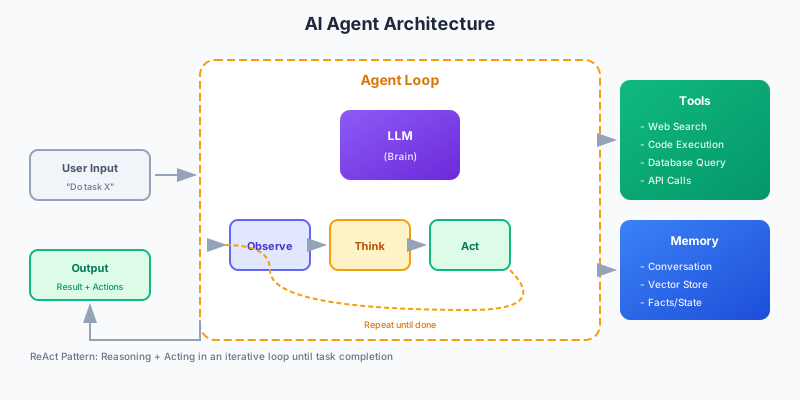
At its core, every agent follows a similar pattern:
1. Observe: Receive input or observe state
2. Think: Reason about what to do next
3. Act: Execute an action (tool call, response)
4. Repeat: Continue until task is complete
This is often called the ReAct (Reasoning + Acting) pattern, and it's the foundation of most modern agent systems.
Core Components of an Agent
1. The Language Model (Brain)
The LLM serves as the reasoning engine. Not all models are equally capable at agentic tasks:
Best models for agents:
- Claude 3.5 Sonnet / Claude 3 Opus - Excellent tool use and reasoning
- GPT-4 / GPT-4 Turbo - Strong general capabilities
- Gemini Pro - Good for multi-modal agent tasks
Key capabilities needed:
- Reliable function/tool calling
- Strong instruction following
- Good at multi-step reasoning
- Low hallucination rate
2. Tools
Tools extend what an agent can do beyond text generation:
from langchain.tools import tool

@tool
def search_web(query: str) -> str:
    """Search the web for current information."""
    # Implementation here
    return search_results

@tool
def execute_code(code: str) -> str:
    """Execute Python code and return the output."""
    # Sandboxed execution
    return execution_result

@tool
def query_database(sql: str) -> str:
    """Query the company database."""
    # Database connection and query
    return query_results
Common tool categories:
- Information retrieval: Web search, RAG, database queries
- Code execution: Python, SQL, shell commands
- External APIs: Email, calendar, CRM systems
- File operations: Read, write, analyze documents
3. Memory Systems
Agents need memory to maintain context and learn from interactions:
Short-term memory:
- Conversation history within a session
- Working memory for current task
Long-term memory:
- Vector stores for semantic retrieval
- Structured storage for facts and preferences
- Episode memory for past interactions
from langchain.memory import ConversationBufferMemory, VectorStoreRetrieverMemory

# Simple conversation memory
short_term = ConversationBufferMemory(
    return_messages=True,
    memory_key="chat_history"
)

# Long-term semantic memory
long_term = VectorStoreRetrieverMemory(
    retriever=vectorstore.as_retriever(k=5),
    memory_key="relevant_history"
)
4. Planning and Orchestration
How the agent decides what to do:
ReAct Pattern:
Thought: I need to find the current stock price
Action: search_web("AAPL stock price today")
Observation: Apple Inc (AAPL) is trading at $178.52
Thought: Now I have the price, I can respond
Action: respond("Apple stock is currently at $178.52")
Plan-and-Execute:
Plan:
1. Search for current stock price
2. Get historical data for comparison
3. Calculate percentage change
4. Provide analysis

Execute each step...
Agent Architectures
Single Agent
One agent handles everything. Simple but limited.
from langchain.agents import create_react_agent

agent = create_react_agent(
    llm=llm,
    tools=tools,
    prompt=react_prompt
)
Best for: Simple tasks, prototyping, single-domain problems
Multi-Agent Systems
Multiple specialized agents collaborate:
# Research agent
researcher = create_agent(
    llm=llm,
    tools=[search_tool, arxiv_tool],
    system_prompt="You are a research specialist..."
)

# Writer agent
writer = create_agent(
    llm=llm,
    tools=[write_tool, edit_tool],
    system_prompt="You are a technical writer..."
)

# Coordinator
coordinator = create_agent(
    llm=llm,
    tools=[delegate_to_researcher, delegate_to_writer],
    system_prompt="You coordinate between specialists..."
)
Best for: Complex workflows, specialized tasks, parallel execution
Hierarchical Agents
Supervisor agents manage worker agents:
Supervisor Agent
    ├── Research Team Lead
    │   ├── Web Researcher
    │   └── Paper Analyst
    └── Content Team Lead
        ├── Writer
        └── Editor
Best for: Large-scale automation, enterprise workflows
Popular Agent Frameworks
LangChain / LangGraph
The most popular framework for building agents:
from langgraph.graph import StateGraph, END
from langchain_openai import ChatOpenAI

# Define state
class AgentState(TypedDict):
    messages: list
    next_action: str

# Create graph
workflow = StateGraph(AgentState)

# Add nodes
workflow.add_node("agent", call_model)
workflow.add_node("tools", execute_tools)

# Add edges
workflow.add_edge("agent", "tools")
workflow.add_conditional_edges(
    "tools",
    should_continue,
    {"continue": "agent", "end": END}
)
Pros: Comprehensive, great documentation, large community Cons: Can be complex, learning curve
CrewAI
Focused on multi-agent collaboration:
from crewai import Agent, Task, Crew

researcher = Agent(
    role="Senior Researcher",
    goal="Find accurate information",
    backstory="Expert at finding and analyzing data",
    tools=[search_tool]
)

analyst = Agent(
    role="Data Analyst",
    goal="Analyze and summarize findings",
    backstory="Skilled at turning data into insights"
)

crew = Crew(
    agents=[researcher, analyst],
    tasks=[research_task, analysis_task]
)

result = crew.kickoff()
Pros: Easy multi-agent setup, role-based design Cons: Less flexible than LangGraph
AutoGen (Microsoft)
Conversational agents that can code:
from autogen import AssistantAgent, UserProxyAgent

assistant = AssistantAgent(
    name="assistant",
    llm_config={"model": "gpt-4"}
)

user_proxy = UserProxyAgent(
    name="user_proxy",
    human_input_mode="NEVER",
    code_execution_config={"work_dir": "coding"}
)

user_proxy.initiate_chat(
    assistant,
    message="Create a plot of stock prices"
)
Pros: Great for coding tasks, automatic code execution Cons: Focused on specific use cases
Production Considerations
Reliability
Agents can fail in many ways. Build in safeguards:
class ReliableAgent:
    def __init__(self, max_retries=3, timeout=30):
        self.max_retries = max_retries
        self.timeout = timeout

    async def execute(self, task):
        for attempt in range(self.max_retries):
            try:
                result = await asyncio.wait_for(
                    self._run(task),
                    timeout=self.timeout
                )
                return result
            except Exception as e:
                if attempt == self.max_retries - 1:
                    return self._fallback_response(task, e)
                await asyncio.sleep(2 ** attempt)
Cost Control
Agent loops can get expensive quickly:
class CostAwareAgent:
    def __init__(self, budget_limit=1.0):
        self.budget_limit = budget_limit
        self.current_spend = 0

    def check_budget(self, estimated_cost):
        if self.current_spend + estimated_cost > self.budget_limit:
            raise BudgetExceededError()
        self.current_spend += estimated_cost
Observability
You need to see what your agent is doing:
from langsmith import trace

@trace
def agent_step(state):
    # Log inputs, outputs, tool calls
    result = agent.invoke(state)
    return result
Key metrics to track:
- Steps per task completion
- Tool call success rates
- Token usage per request
- Latency per step
- Error rates by type
Security
Agents with tools can be dangerous:
- Sandbox code execution - Never run untrusted code directly
- Limit tool permissions - Principle of least privilege
- Validate tool inputs - Prevent injection attacks
- Rate limit actions - Prevent runaway agents
- Human-in-the-loop - Require approval for sensitive actions
When to Use Agents (and When Not To)
Use agents when:
- Tasks require multiple steps and decisions
- You need to interact with external systems
- The workflow isn't fully predictable
- Users need autonomous assistance
Don't use agents when:
- A simple prompt can solve the problem
- Latency is critical (agents are slow)
- You need deterministic outputs
- The task is well-defined and linear
Getting Started
Start simple and add complexity as needed:
# Week 1: Basic ReAct agent with 2-3 tools
# Week 2: Add memory and better prompts
# Week 3: Add error handling and retries
# Week 4: Implement observability
# Week 5: Add human-in-the-loop for critical actions
# Week 6: Optimize for production
The best agent is the simplest one that solves your problem reliably.
Conclusion
AI agents are powerful but complex. Success requires understanding the fundamentals, choosing the right architecture for your use case, and building with production concerns in mind from the start.
Start with a clear problem, build incrementally, and always prioritize reliability over capability. The goal isn't the most sophisticated agent it's the one that consistently delivers value.