Jared AI Hub
Published on

Multimodal AI: Building with Vision-Language Models

Authors
  • avatar
    Name
    Jared Chung
    Twitter

Introduction

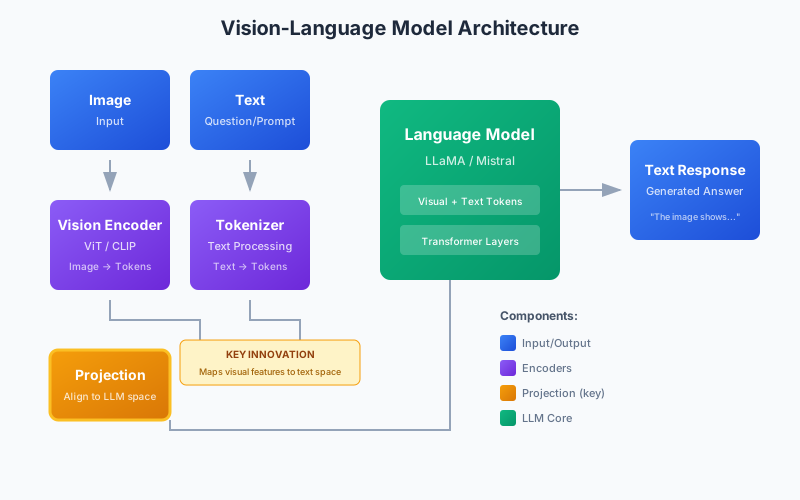
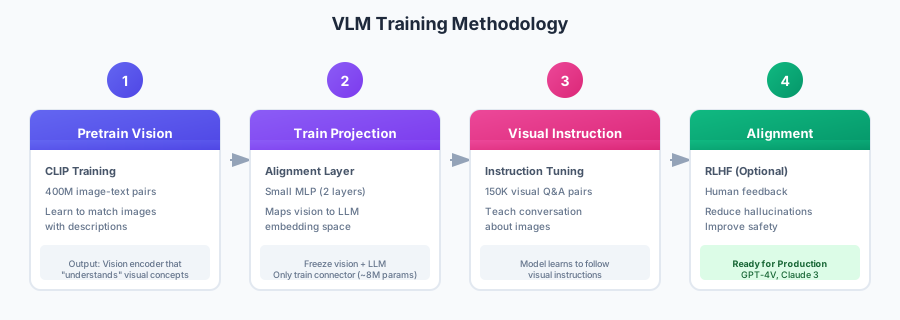
Multimodal AI models can understand and reason about multiple types of data - typically images and text together. These Vision-Language Models (VLMs) enable powerful applications like image captioning, visual question answering, document understanding, and more. In this post, we'll explore the landscape of multimodal models and build practical applications.

The Multimodal Landscape

Commercial Models

ModelProviderStrengths
GPT-4V/GPT-4oOpenAIBest overall quality
Claude 3AnthropicStrong reasoning
Gemini Pro VisionGoogleFast, good value

Open Source Models

ModelParametersLicenseBest For
LLaVA 1.67B-34BApache 2.0General VQA
Qwen-VL7BQwen LicenseMultilingual
CogVLM17BApache 2.0High quality
Fuyu8BCC-BY-NCDocument understanding
MiniGPT-47BBSD 3Lightweight
InternVL6B-26BMITChinese + English

Using GPT-4 Vision

Basic Image Understanding

from openai import OpenAI
import base64

client = OpenAI()

def encode_image(image_path: str) -> str:
    """Encode image to base64."""
    with open(image_path, "rb") as f:
        return base64.b64encode(f.read()).decode("utf-8")

def analyze_image(image_path: str, prompt: str) -> str:
    """Analyze an image with GPT-4V."""
    base64_image = encode_image(image_path)

    response = client.chat.completions.create(
        model="gpt-4o",
        messages=[
            {
                "role": "user",
                "content": [
                    {"type": "text", "text": prompt},
                    {
                        "type": "image_url",
                        "image_url": {
                            "url": f"data:image/jpeg;base64,{base64_image}",
                            "detail": "high"  # or "low" for faster/cheaper
                        }
                    }
                ]
            }
        ],
        max_tokens=1000
    )

    return response.choices[0].message.content

# Example usage
result = analyze_image(
    "chart.png",
    "Analyze this chart. What trends do you see? Provide specific numbers."
)
print(result)

Multiple Images

def compare_images(image_paths: list[str], prompt: str) -> str:
    """Compare multiple images."""
    content = [{"type": "text", "text": prompt}]

    for path in image_paths:
        base64_image = encode_image(path)
        content.append({
            "type": "image_url",
            "image_url": {"url": f"data:image/jpeg;base64,{base64_image}"}
        })

    response = client.chat.completions.create(
        model="gpt-4o",
        messages=[{"role": "user", "content": content}],
        max_tokens=1500
    )

    return response.choices[0].message.content

# Compare before/after images
result = compare_images(
    ["before.jpg", "after.jpg"],
    "Compare these two images and describe the differences."
)

URL-based Images

response = client.chat.completions.create(
    model="gpt-4o",
    messages=[
        {
            "role": "user",
            "content": [
                {"type": "text", "text": "What's in this image?"},
                {
                    "type": "image_url",
                    "image_url": {"url": "https://example.com/image.jpg"}
                }
            ]
        }
    ]
)

LLaVA: Open Source Vision-Language

LLaVA (Large Language and Vision Assistant) is one of the best open-source VLMs.

Using with Transformers

from transformers import AutoProcessor, LlavaForConditionalGeneration
from PIL import Image
import torch

model_id = "llava-hf/llava-1.5-7b-hf"

# Load model and processor
processor = AutoProcessor.from_pretrained(model_id)
model = LlavaForConditionalGeneration.from_pretrained(
    model_id,
    torch_dtype=torch.float16,
    device_map="auto"
)

def ask_llava(image_path: str, question: str) -> str:
    """Query LLaVA about an image."""
    image = Image.open(image_path)

    # Format prompt
    prompt = f"USER: <image>\n{question}\nASSISTANT:"

    # Process inputs
    inputs = processor(
        text=prompt,
        images=image,
        return_tensors="pt"
    ).to(model.device, torch.float16)

    # Generate
    output = model.generate(
        **inputs,
        max_new_tokens=500,
        do_sample=True,
        temperature=0.7
    )

    # Decode
    response = processor.decode(output[0], skip_special_tokens=True)
    return response.split("ASSISTANT:")[-1].strip()

# Example
answer = ask_llava("diagram.png", "Explain this diagram step by step.")
print(answer)

Using with Ollama

# Pull LLaVA model
ollama pull llava

# Run with image
ollama run llava "Describe this image: ./photo.jpg"
import ollama

response = ollama.chat(
    model='llava',
    messages=[
        {
            'role': 'user',
            'content': 'What objects are in this image?',
            'images': ['./photo.jpg']
        }
    ]
)
print(response['message']['content'])

Qwen-VL: Multilingual Vision

Qwen-VL excels at multilingual image understanding.

from transformers import AutoModelForCausalLM, AutoTokenizer

model_id = "Qwen/Qwen-VL-Chat"

tokenizer = AutoTokenizer.from_pretrained(model_id, trust_remote_code=True)
model = AutoModelForCausalLM.from_pretrained(
    model_id,
    device_map="auto",
    trust_remote_code=True
).eval()

# Query with image
query = tokenizer.from_list_format([
    {'image': 'path/to/image.jpg'},
    {'text': 'Describe what you see in this image.'},
])

response, history = model.chat(tokenizer, query=query, history=None)
print(response)

# Follow-up question (with context)
response, history = model.chat(
    tokenizer,
    query='What colors are prominent?',
    history=history
)
print(response)

Practical Applications

Document Understanding

def extract_from_document(image_path: str, extraction_prompt: str) -> dict:
    """Extract structured information from a document image."""
    import json

    base64_image = encode_image(image_path)

    response = client.chat.completions.create(
        model="gpt-4o",
        messages=[
            {
                "role": "system",
                "content": "Extract information from documents accurately. Return JSON."
            },
            {
                "role": "user",
                "content": [
                    {"type": "text", "text": extraction_prompt},
                    {
                        "type": "image_url",
                        "image_url": {"url": f"data:image/png;base64,{base64_image}"}
                    }
                ]
            }
        ],
        response_format={"type": "json_object"}
    )

    return json.loads(response.choices[0].message.content)

# Extract from invoice
invoice_data = extract_from_document(
    "invoice.png",
    """Extract from this invoice:
    - Invoice number
    - Date
    - Total amount
    - Line items (description, quantity, price)
    Return as JSON."""
)
print(invoice_data)

Chart Analysis

def analyze_chart(image_path: str) -> dict:
    """Analyze a chart and extract insights."""
    prompt = """Analyze this chart and provide:
    1. Chart type (bar, line, pie, etc.)
    2. What data is being shown
    3. Key trends or patterns
    4. Any notable outliers
    5. The main takeaway

    Be specific with numbers when visible."""

    result = analyze_image(image_path, prompt)
    return result

Visual QA System

class VisualQASystem:
    """Interactive visual question answering system."""

    def __init__(self, model: str = "gpt-4o"):
        self.client = OpenAI()
        self.model = model
        self.conversation_history = []
        self.current_image = None

    def set_image(self, image_path: str):
        """Set the image for Q&A."""
        self.current_image = encode_image(image_path)
        self.conversation_history = []
        print(f"Image loaded: {image_path}")

    def ask(self, question: str) -> str:
        """Ask a question about the current image."""
        if not self.current_image:
            return "Please load an image first with set_image()"

        # Build message with image on first question
        if not self.conversation_history:
            user_message = {
                "role": "user",
                "content": [
                    {"type": "text", "text": question},
                    {
                        "type": "image_url",
                        "image_url": {"url": f"data:image/jpeg;base64,{self.current_image}"}
                    }
                ]
            }
        else:
            user_message = {"role": "user", "content": question}

        self.conversation_history.append(user_message)

        response = self.client.chat.completions.create(
            model=self.model,
            messages=self.conversation_history,
            max_tokens=500
        )

        assistant_message = response.choices[0].message
        self.conversation_history.append({
            "role": "assistant",
            "content": assistant_message.content
        })

        return assistant_message.content

# Usage
qa = VisualQASystem()
qa.set_image("product.jpg")
print(qa.ask("What product is shown?"))
print(qa.ask("What color is it?"))
print(qa.ask("How much might it cost?"))

Image-based RAG

import chromadb
from PIL import Image
import torch
from transformers import CLIPProcessor, CLIPModel

class ImageRAG:
    """RAG system for images."""

    def __init__(self):
        # CLIP for image embeddings
        self.clip_model = CLIPModel.from_pretrained("openai/clip-vit-base-patch32")
        self.clip_processor = CLIPProcessor.from_pretrained("openai/clip-vit-base-patch32")

        # Vector store
        self.client = chromadb.Client()
        self.collection = self.client.create_collection("images")

        self.image_paths = {}

    def add_image(self, image_path: str, metadata: dict = None):
        """Add an image to the index."""
        image = Image.open(image_path)
        inputs = self.clip_processor(images=image, return_tensors="pt")

        with torch.no_grad():
            embedding = self.clip_model.get_image_features(**inputs)
            embedding = embedding.squeeze().numpy().tolist()

        image_id = f"img_{len(self.image_paths)}"
        self.image_paths[image_id] = image_path

        self.collection.add(
            embeddings=[embedding],
            metadatas=[metadata or {}],
            ids=[image_id]
        )

    def search_by_text(self, query: str, n_results: int = 5) -> list:
        """Search images by text description."""
        inputs = self.clip_processor(text=[query], return_tensors="pt", padding=True)

        with torch.no_grad():
            text_embedding = self.clip_model.get_text_features(**inputs)
            text_embedding = text_embedding.squeeze().numpy().tolist()

        results = self.collection.query(
            query_embeddings=[text_embedding],
            n_results=n_results
        )

        return [
            {
                "path": self.image_paths[id],
                "distance": dist,
                "metadata": meta
            }
            for id, dist, meta in zip(
                results["ids"][0],
                results["distances"][0],
                results["metadatas"][0]
            )
        ]

# Usage
rag = ImageRAG()
rag.add_image("cat.jpg", {"category": "animals"})
rag.add_image("car.jpg", {"category": "vehicles"})
rag.add_image("sunset.jpg", {"category": "nature"})

results = rag.search_by_text("a fluffy pet")
for r in results:
    print(f"{r['path']}: {r['distance']:.3f}")

Optimizing for Production

Batch Processing

import asyncio
from openai import AsyncOpenAI

async def analyze_batch(image_paths: list[str], prompt: str) -> list[str]:
    """Analyze multiple images concurrently."""
    client = AsyncOpenAI()

    async def analyze_one(path: str) -> str:
        base64_image = encode_image(path)

        response = await client.chat.completions.create(
            model="gpt-4o-mini",  # Faster, cheaper
            messages=[
                {
                    "role": "user",
                    "content": [
                        {"type": "text", "text": prompt},
                        {
                            "type": "image_url",
                            "image_url": {
                                "url": f"data:image/jpeg;base64,{base64_image}",
                                "detail": "low"  # Faster
                            }
                        }
                    ]
                }
            ],
            max_tokens=200
        )
        return response.choices[0].message.content

    tasks = [analyze_one(path) for path in image_paths]
    return await asyncio.gather(*tasks)

# Run
results = asyncio.run(analyze_batch(
    ["img1.jpg", "img2.jpg", "img3.jpg"],
    "Describe this image in one sentence."
))

Cost Optimization

ModelImage CostBest For
GPT-4o (low detail)~$0.003Quick classification
GPT-4o (high detail)~$0.01Detailed analysis
GPT-4o-mini~$0.001High volume, simple tasks
LLaVA (local)$0Privacy, offline
# Use low detail for classification
response = client.chat.completions.create(
    model="gpt-4o-mini",
    messages=[{
        "role": "user",
        "content": [
            {"type": "text", "text": "Is this a cat or dog? One word answer."},
            {
                "type": "image_url",
                "image_url": {
                    "url": f"data:image/jpeg;base64,{base64_image}",
                    "detail": "low"
                }
            }
        ]
    }],
    max_tokens=10
)

Complete Multimodal Application

Here's a production-ready multimodal application that combines several techniques:

from openai import OpenAI
import base64
from PIL import Image
import io
from dataclasses import dataclass
from typing import List, Optional, Dict
import json

@dataclass
class ImageAnalysisResult:
    """Structured result from image analysis."""
    description: str
    objects: List[str]
    text_content: Optional[str]
    dominant_colors: List[str]
    sentiment: str
    metadata: Dict

class MultimodalAnalyzer:
    """Production-ready multimodal analysis system."""

    def __init__(self, model: str = "gpt-4o"):
        self.client = OpenAI()
        self.model = model

    def encode_image(self, image_source) -> str:
        """Encode image to base64 from path or PIL Image."""
        if isinstance(image_source, str):
            with open(image_source, "rb") as f:
                return base64.b64encode(f.read()).decode("utf-8")
        elif isinstance(image_source, Image.Image):
            buffer = io.BytesIO()
            image_source.save(buffer, format="PNG")
            return base64.b64encode(buffer.getvalue()).decode("utf-8")
        else:
            raise ValueError("Image source must be path or PIL Image")

    def analyze(self, image_source, analysis_type: str = "general") -> ImageAnalysisResult:
        """Analyze an image with specified focus."""
        base64_image = self.encode_image(image_source)

        prompts = {
            "general": "Analyze this image comprehensively. Describe what you see.",
            "objects": "List all objects visible in this image with their positions.",
            "text": "Extract all text visible in this image, preserving formatting.",
            "technical": "Provide technical details: resolution quality, composition, lighting.",
            "accessibility": "Describe this image for someone who cannot see it."
        }

        analysis_prompt = prompts.get(analysis_type, prompts["general"])

        response = self.client.chat.completions.create(
            model=self.model,
            messages=[
                {
                    "role": "system",
                    "content": """You are an expert image analyst. Provide detailed, accurate analysis.
                    Return your response as JSON with these fields:
                    - description: string
                    - objects: array of strings
                    - text_content: string or null
                    - dominant_colors: array of color names
                    - sentiment: one of [positive, negative, neutral]
                    - metadata: object with any additional relevant info"""
                },
                {
                    "role": "user",
                    "content": [
                        {"type": "text", "text": analysis_prompt},
                        {
                            "type": "image_url",
                            "image_url": {
                                "url": f"data:image/png;base64,{base64_image}",
                                "detail": "high"
                            }
                        }
                    ]
                }
            ],
            response_format={"type": "json_object"},
            max_tokens=1500
        )

        data = json.loads(response.choices[0].message.content)

        return ImageAnalysisResult(
            description=data.get("description", ""),
            objects=data.get("objects", []),
            text_content=data.get("text_content"),
            dominant_colors=data.get("dominant_colors", []),
            sentiment=data.get("sentiment", "neutral"),
            metadata=data.get("metadata", {})
        )

    def compare_images(self, image1, image2, comparison_type: str = "differences") -> Dict:
        """Compare two images."""
        img1_b64 = self.encode_image(image1)
        img2_b64 = self.encode_image(image2)

        prompts = {
            "differences": "Identify all differences between these two images.",
            "similarity": "How similar are these images? What do they have in common?",
            "before_after": "Analyze these as before/after images. What changed?",
            "ranking": "Which image is better quality/composition and why?"
        }

        response = self.client.chat.completions.create(
            model=self.model,
            messages=[
                {
                    "role": "user",
                    "content": [
                        {"type": "text", "text": prompts.get(comparison_type, prompts["differences"])},
                        {
                            "type": "image_url",
                            "image_url": {"url": f"data:image/png;base64,{img1_b64}"}
                        },
                        {
                            "type": "image_url",
                            "image_url": {"url": f"data:image/png;base64,{img2_b64}"}
                        }
                    ]
                }
            ],
            max_tokens=1000
        )

        return {"comparison": response.choices[0].message.content}

    def extract_structured_data(self, image_source, schema: Dict) -> Dict:
        """Extract structured data from an image based on a schema."""
        base64_image = self.encode_image(image_source)

        prompt = f"""Extract information from this image according to this schema:
{json.dumps(schema, indent=2)}

Return valid JSON matching the schema exactly."""

        response = self.client.chat.completions.create(
            model=self.model,
            messages=[
                {
                    "role": "user",
                    "content": [
                        {"type": "text", "text": prompt},
                        {
                            "type": "image_url",
                            "image_url": {"url": f"data:image/png;base64,{base64_image}"}
                        }
                    ]
                }
            ],
            response_format={"type": "json_object"},
            max_tokens=1500
        )

        return json.loads(response.choices[0].message.content)


# Usage examples
if __name__ == "__main__":
    analyzer = MultimodalAnalyzer()

    # General analysis
    result = analyzer.analyze("product_image.jpg", "general")
    print(f"Description: {result.description}")
    print(f"Objects: {result.objects}")
    print(f"Colors: {result.dominant_colors}")

    # Extract receipt data
    receipt_schema = {
        "store_name": "string",
        "date": "string (YYYY-MM-DD)",
        "items": [{"name": "string", "quantity": "number", "price": "number"}],
        "total": "number",
        "payment_method": "string"
    }

    receipt_data = analyzer.extract_structured_data("receipt.jpg", receipt_schema)
    print(f"Receipt total: ${receipt_data.get('total', 'N/A')}")

    # Compare before/after
    comparison = analyzer.compare_images("before.jpg", "after.jpg", "before_after")
    print(comparison["comparison"])

Video Analysis

Extend multimodal capabilities to video by extracting frames:

import cv2
import numpy as np
from PIL import Image
from typing import List, Tuple
import asyncio
from openai import AsyncOpenAI

class VideoAnalyzer:
    """Analyze videos by sampling frames and using VLMs."""

    def __init__(self, model: str = "gpt-4o"):
        self.client = AsyncOpenAI()
        self.model = model

    def extract_frames(
        self,
        video_path: str,
        n_frames: int = 10,
        strategy: str = "uniform"
    ) -> List[Tuple[float, Image.Image]]:
        """Extract frames from video."""
        cap = cv2.VideoCapture(video_path)
        total_frames = int(cap.get(cv2.CAP_PROP_FRAME_COUNT))
        fps = cap.get(cv2.CAP_PROP_FPS)

        if strategy == "uniform":
            indices = np.linspace(0, total_frames - 1, n_frames, dtype=int)
        elif strategy == "keyframes":
            # Simple scene change detection
            indices = self._detect_scene_changes(cap, n_frames)
        else:
            indices = range(0, total_frames, total_frames // n_frames)[:n_frames]

        frames = []
        for idx in indices:
            cap.set(cv2.CAP_PROP_POS_FRAMES, idx)
            ret, frame = cap.read()
            if ret:
                frame_rgb = cv2.cvtColor(frame, cv2.COLOR_BGR2RGB)
                pil_image = Image.fromarray(frame_rgb)
                timestamp = idx / fps
                frames.append((timestamp, pil_image))

        cap.release()
        return frames

    def _detect_scene_changes(self, cap, n_frames: int) -> List[int]:
        """Detect scene changes using frame differences."""
        prev_frame = None
        differences = []

        total_frames = int(cap.get(cv2.CAP_PROP_FRAME_COUNT))
        sample_indices = range(0, total_frames, max(1, total_frames // 100))

        for idx in sample_indices:
            cap.set(cv2.CAP_PROP_POS_FRAMES, idx)
            ret, frame = cap.read()
            if not ret:
                continue

            gray = cv2.cvtColor(frame, cv2.COLOR_BGR2GRAY)

            if prev_frame is not None:
                diff = np.mean(np.abs(gray.astype(float) - prev_frame.astype(float)))
                differences.append((idx, diff))

            prev_frame = gray

        # Select frames with highest differences
        differences.sort(key=lambda x: x[1], reverse=True)
        selected = [d[0] for d in differences[:n_frames]]
        selected.sort()

        return selected

    async def analyze_video(self, video_path: str, question: str = None) -> Dict:
        """Analyze video by processing sampled frames."""
        frames = self.extract_frames(video_path, n_frames=8)

        # Encode frames
        encoded_frames = []
        for timestamp, frame in frames:
            buffer = io.BytesIO()
            frame.save(buffer, format="PNG")
            b64 = base64.b64encode(buffer.getvalue()).decode("utf-8")
            encoded_frames.append((timestamp, b64))

        # Build content with frames
        content = [
            {
                "type": "text",
                "text": f"""Analyze this video represented by {len(frames)} frames.
Each frame shows the timestamp in seconds.

{question or 'Describe what happens in this video.'}

Provide a coherent narrative of the video content."""
            }
        ]

        for timestamp, b64 in encoded_frames:
            content.append({
                "type": "text",
                "text": f"[Frame at {timestamp:.1f}s]"
            })
            content.append({
                "type": "image_url",
                "image_url": {"url": f"data:image/png;base64,{b64}", "detail": "low"}
            })

        response = await self.client.chat.completions.create(
            model=self.model,
            messages=[{"role": "user", "content": content}],
            max_tokens=1500
        )

        return {
            "analysis": response.choices[0].message.content,
            "frames_analyzed": len(frames),
            "timestamps": [t for t, _ in frames]
        }


# Usage
async def main():
    analyzer = VideoAnalyzer()
    result = await analyzer.analyze_video(
        "demo_video.mp4",
        "What are the main events in this video?"
    )
    print(result["analysis"])

# asyncio.run(main())

Building a Multimodal RAG System

Combine image understanding with document retrieval:

import chromadb
from PIL import Image
import torch
from transformers import CLIPProcessor, CLIPModel
from sentence_transformers import SentenceTransformer
from typing import List, Dict, Union
import hashlib

class MultimodalRAG:
    """RAG system supporting both text and images."""

    def __init__(self):
        # CLIP for images
        self.clip_model = CLIPModel.from_pretrained("openai/clip-vit-base-patch32")
        self.clip_processor = CLIPProcessor.from_pretrained("openai/clip-vit-base-patch32")

        # Sentence transformer for text
        self.text_model = SentenceTransformer("all-MiniLM-L6-v2")

        # Vector stores
        self.client = chromadb.Client()
        self.image_collection = self.client.create_collection("images")
        self.text_collection = self.client.create_collection("text")

        # Storage for image paths
        self.image_store = {}

        # OpenAI for generation
        self.llm_client = OpenAI()

    def add_image(self, image_path: str, description: str = None, metadata: Dict = None):
        """Add an image to the index."""
        image = Image.open(image_path)

        # Get CLIP embedding
        inputs = self.clip_processor(images=image, return_tensors="pt")
        with torch.no_grad():
            embedding = self.clip_model.get_image_features(**inputs)
            embedding = embedding.squeeze().numpy().tolist()

        # Generate ID
        image_id = hashlib.md5(image_path.encode()).hexdigest()[:16]
        self.image_store[image_id] = image_path

        # Store
        self.image_collection.add(
            embeddings=[embedding],
            metadatas=[{
                "path": image_path,
                "description": description or "",
                **(metadata or {})
            }],
            ids=[image_id]
        )

    def add_text(self, text: str, source: str = None, metadata: Dict = None):
        """Add text to the index."""
        embedding = self.text_model.encode(text).tolist()
        text_id = hashlib.md5(text.encode()).hexdigest()[:16]

        self.text_collection.add(
            documents=[text],
            embeddings=[embedding],
            metadatas=[{"source": source or "", **(metadata or {})}],
            ids=[text_id]
        )

    def search(
        self,
        query: Union[str, Image.Image],
        modality: str = "both",
        n_results: int = 5
    ) -> Dict:
        """Search by text or image query."""
        results = {"images": [], "texts": []}

        if isinstance(query, str):
            # Text query
            text_embedding = self.text_model.encode(query).tolist()

            # Also get CLIP text embedding for image search
            clip_inputs = self.clip_processor(text=[query], return_tensors="pt", padding=True)
            with torch.no_grad():
                clip_embedding = self.clip_model.get_text_features(**clip_inputs)
                clip_embedding = clip_embedding.squeeze().numpy().tolist()

            if modality in ["text", "both"]:
                text_results = self.text_collection.query(
                    query_embeddings=[text_embedding],
                    n_results=n_results
                )
                results["texts"] = [
                    {"text": doc, "metadata": meta}
                    for doc, meta in zip(
                        text_results["documents"][0],
                        text_results["metadatas"][0]
                    )
                ]

            if modality in ["images", "both"]:
                image_results = self.image_collection.query(
                    query_embeddings=[clip_embedding],
                    n_results=n_results
                )
                results["images"] = [
                    {
                        "path": self.image_store.get(id_),
                        "metadata": meta
                    }
                    for id_, meta in zip(
                        image_results["ids"][0],
                        image_results["metadatas"][0]
                    )
                ]

        elif isinstance(query, Image.Image):
            # Image query
            inputs = self.clip_processor(images=query, return_tensors="pt")
            with torch.no_grad():
                embedding = self.clip_model.get_image_features(**inputs)
                embedding = embedding.squeeze().numpy().tolist()

            image_results = self.image_collection.query(
                query_embeddings=[embedding],
                n_results=n_results
            )
            results["images"] = [
                {"path": self.image_store.get(id_), "metadata": meta}
                for id_, meta in zip(
                    image_results["ids"][0],
                    image_results["metadatas"][0]
                )
            ]

        return results

    def query_with_context(self, question: str, include_images: bool = True) -> str:
        """Query with multimodal context."""
        # Retrieve relevant content
        search_results = self.search(question, modality="both" if include_images else "text")

        # Build context
        text_context = "\n".join([r["text"] for r in search_results["texts"]])

        # Build messages
        content = [{"type": "text", "text": f"Context:\n{text_context}\n\nQuestion: {question}"}]

        # Add images if available
        if include_images and search_results["images"]:
            for img_result in search_results["images"][:3]:  # Limit to 3 images
                if img_result["path"]:
                    with open(img_result["path"], "rb") as f:
                        b64 = base64.b64encode(f.read()).decode("utf-8")
                    content.append({
                        "type": "image_url",
                        "image_url": {"url": f"data:image/png;base64,{b64}", "detail": "low"}
                    })

        response = self.llm_client.chat.completions.create(
            model="gpt-4o",
            messages=[
                {
                    "role": "system",
                    "content": "Answer questions using the provided text and image context."
                },
                {"role": "user", "content": content}
            ],
            max_tokens=1000
        )

        return response.choices[0].message.content


# Usage
rag = MultimodalRAG()

# Index content
rag.add_text("Our flagship product features a sleek aluminum design.", source="product_docs")
rag.add_image("product_photo.jpg", description="Product front view", metadata={"category": "products"})

# Query
answer = rag.query_with_context("What does the product look like?")
print(answer)

Conclusion

Multimodal AI opens up powerful new applications:

  • GPT-4V/Claude 3: Best quality, easiest to use for production
  • LLaVA: Best open-source option for local deployment
  • Qwen-VL: Best for multilingual use cases
  • CLIP: Best for image search and embeddings without generation

Key recommendations:

  1. Start with GPT-4o for prototyping - best quality and easiest to use
  2. Use detail: low when speed matters more than fine details
  3. Batch processing with async calls for throughput
  4. Extract frames for video analysis - VLMs work on images
  5. Combine with RAG for domain-specific knowledge

The field is rapidly evolving - expect open-source models to close the gap with commercial offerings.

References