- Published on
Vector Databases Explained: Architecture and Selection Guide
- Authors

- Name
- Jared Chung
Introduction
Vector databases have become essential infrastructure for AI applications. They power semantic search, recommendation systems, and Retrieval Augmented Generation (RAG). But what exactly makes them different from traditional databases, and how do you choose the right one?
This guide explains the architecture behind vector databases, the algorithms that make them fast, and provides practical guidance for selecting the right option for your use case.
Why Vector Databases?
The Semantic Gap
Traditional databases excel at exact matching:
SELECT * FROM products WHERE name = 'iPhone 15';
But they can't handle queries like "smartphones with good cameras" because they don't understand that "good cameras" relates to megapixels, aperture, and low-light performance.
Semantic search solves this by:
- Converting text to vectors that capture meaning
- Finding similar vectors to match concepts, not just keywords
- Scaling efficiently to millions of documents
What is a Vector Embedding?
An embedding is a numerical representation of data where similar items have similar numbers. The core insight is that meaning can be captured in geometry:
| Text | Vector (simplified) |
|---|---|
| "I love Python programming" | [0.8, 0.3, 0.9, 0.1] |
| "Python is my favorite language" | [0.75, 0.28, 0.85, 0.15] |
| "The weather is nice today" | [0.1, 0.9, 0.2, 0.7] |
The first two texts have similar vectors because they express similar meanings. The third is geometrically distant because it's semantically unrelated.
Modern embedding models like all-MiniLM-L6-v2 produce 384-dimensional vectors. Larger models like text-embedding-3-large produce 3072 dimensions. More dimensions capture finer semantic distinctions but require more storage and compute.
How Vector Databases Work
The Architecture
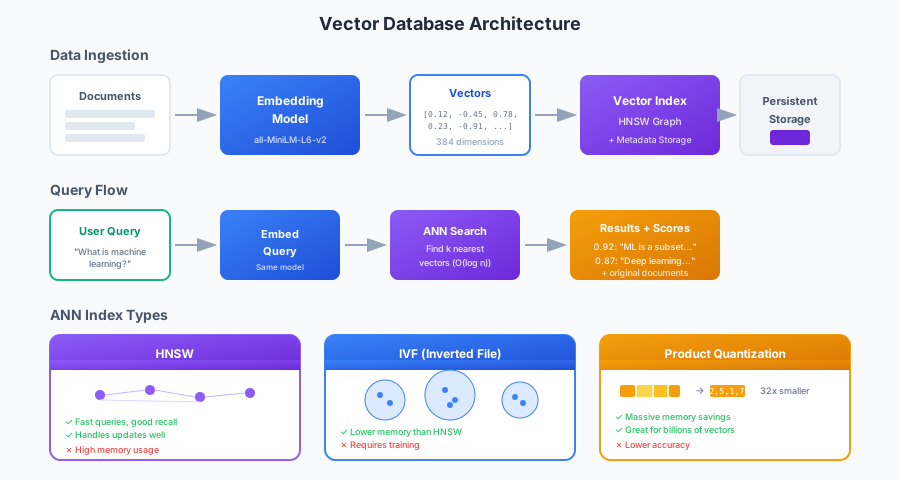
A vector database has two main flows:
Ingestion Flow
- Documents arrive (text, images, or any data)
- Embedding model converts them to vectors
- Vector index organizes vectors for efficient search
- Storage layer persists vectors and original documents
Query Flow
- Query arrives ("What is machine learning?")
- Same embedding model converts query to vector
- ANN search finds k nearest vectors in the index
- Results returned with similarity scores and original documents
The key insight: the same embedding model must be used for both documents and queries. Different models produce incompatible vector spaces.
The Nearest Neighbor Problem
Given a query vector, find the k most similar vectors in the database.
Brute Force Approach:
- Compare query with every vector in database
- Time complexity: O(n) where n = number of vectors
- For 1 million 384-dimensional vectors: 384 million float comparisons per query
- Result: Too slow for production
The Solution: Approximate Nearest Neighbor (ANN)
ANN algorithms trade perfect accuracy for speed. Instead of guaranteed exact matches, they find vectors that are very likely to be the nearest neighbors with high probability.
ANN Index Algorithms
The choice of index algorithm determines your speed/accuracy/memory tradeoffs.
HNSW (Hierarchical Navigable Small World)
HNSW is the most popular algorithm. It builds a multi-layer graph where each layer contains fewer nodes with longer-range connections.
How it works:
- Start search at the top layer (few nodes, long connections)
- Greedily navigate toward the query vector
- Drop to the next layer and continue
- Repeat until reaching the bottom layer with all nodes
Think of it like navigating a map: start with highways (top layer), then main roads, then local streets.
Characteristics:
| Aspect | Rating |
|---|---|
| Query Speed | Excellent |
| Recall (accuracy) | Very Good |
| Memory Usage | High |
| Update Handling | Good |
| Best For | General purpose, real-time apps |
Key Parameters:
M: Connections per node (higher = better recall, more memory)ef_construction: Build-time search width (higher = better index quality)ef_search: Query-time search width (higher = better recall, slower)
IVF (Inverted File Index)
IVF clusters vectors and only searches relevant clusters.
How it works:
- During indexing, group vectors into clusters (using k-means)
- For each query, identify the most promising clusters
- Search only within those clusters
Characteristics:
| Aspect | Rating |
|---|---|
| Query Speed | Good |
| Recall | Good (depends on nprobe) |
| Memory Usage | Lower than HNSW |
| Update Handling | Poor (requires retraining) |
| Best For | Static datasets, memory-constrained |
Key Parameters:
nlist: Number of clustersnprobe: Clusters to search (higher = better recall, slower)
Product Quantization (PQ)
PQ compresses vectors by splitting them into subvectors and quantizing each to a codebook ID.
How it works:
- Split 384-dimensional vector into 8 subvectors of 48 dimensions each
- Learn a codebook of 256 centroids for each subvector
- Replace each subvector with its nearest centroid ID (1 byte)
- Result: 384 floats (1536 bytes) → 8 bytes (192x compression)
Characteristics:
| Aspect | Rating |
|---|---|
| Query Speed | Good |
| Recall | Lower (lossy compression) |
| Memory Usage | Excellent (32x+ reduction) |
| Best For | Billions of vectors, cost-sensitive |
Often combined with IVF as IVF-PQ for memory-efficient large-scale search.
Distance Metrics
How similarity is calculated:
| Metric | Use Case |
|---|---|
| Cosine | Normalized embeddings (most common) |
| Euclidean (L2) | When vector magnitude matters |
| Dot Product | Recommendation systems with magnitude as relevance |
For text embeddings, cosine similarity is almost always the right choice because it measures directional similarity regardless of vector length.
Vector Database Comparison
The Options
| Database | Type | Best For |
|---|---|---|
| ChromaDB | Embedded/Local | Prototyping, small datasets |
| Pinecone | Managed Cloud | Production SaaS, minimal ops |
| Weaviate | Self-hosted/Cloud | Hybrid search, GraphQL |
| Qdrant | Self-hosted/Cloud | Performance, complex filtering |
| Milvus | Self-hosted | Enterprise scale, GPU support |
Decision Framework
Choose ChromaDB when:
- Prototyping or learning vector databases
- Dataset under 1 million vectors
- Want simplest possible setup
- Embedded in application is acceptable
ChromaDB runs in-process with your Python code—no separate server needed.
Choose Pinecone when:
- Production SaaS application
- Don't want to manage infrastructure
- Need enterprise features (SSO, audit logs)
- Willing to pay for managed service
- Serverless scaling is important
Pinecone handles sharding, replication, and backups automatically.
Choose Weaviate when:
- Need hybrid search (vector + keyword BM25)
- GraphQL API preferred
- Multi-modal data (text + images)
- Want self-hosted with cloud option
- Need schema-based data modeling
Weaviate's hybrid search combines the precision of keyword matching with the semantic understanding of vectors.
Choose Qdrant when:
- Performance is critical
- Need advanced filtering on metadata
- Prefer Rust-based reliability
- Self-hosted infrastructure is acceptable
- Large-scale filtering workloads
Qdrant's payload indexing enables efficient filtered search at scale.
Practical Implementation
ChromaDB Quick Start
ChromaDB is the fastest way to get started. It runs in-process with your Python code, handles embedding generation automatically (using a default model if you don't specify one), and persists data to disk without requiring a separate server.
The basic workflow is:
- Create a persistent client that stores data in a local directory
- Create a collection with your preferred similarity metric
- Add documents with optional metadata for filtering
- Query using natural language—ChromaDB embeds your query and finds similar documents
import chromadb

# Create client (persistent storage)
client = chromadb.PersistentClient(path="./chroma_db")

# Create collection
collection = client.create_collection(
    name="documents",
    metadata={"hnsw:space": "cosine"}
)

# Add documents (embedding handled automatically)
collection.add(
    documents=[
        "Machine learning is a subset of AI",
        "Deep learning uses neural networks",
        "NLP processes human language",
    ],
    metadatas=[{"topic": "ml"}, {"topic": "dl"}, {"topic": "nlp"}],
    ids=["doc1", "doc2", "doc3"]
)

# Query
results = collection.query(
    query_texts=["What is deep learning?"],
    n_results=2
)
Pinecone Production Setup
For production workloads, Pinecone handles infrastructure concerns like sharding, replication, and scaling automatically. Unlike ChromaDB, Pinecone requires you to generate embeddings separately and upload the vectors directly.
The setup process involves:
- Initialize the client with your API key
- Create a serverless index specifying dimension (must match your embedding model) and distance metric
- Convert documents to embeddings using your chosen model
- Upsert vectors with metadata that you'll want to retrieve later
- Query by embedding your search text and requesting the top matching vectors
from pinecone import Pinecone, ServerlessSpec
from sentence_transformers import SentenceTransformer

# Initialize
pc = Pinecone(api_key="your-api-key")
model = SentenceTransformer('all-MiniLM-L6-v2')

# Create serverless index
pc.create_index(
    name="semantic-search",
    dimension=384,
    metric="cosine",
    spec=ServerlessSpec(cloud="aws", region="us-east-1")
)

index = pc.Index("semantic-search")

# Upsert with embeddings
documents = ["Python for data science", "JavaScript for web dev"]
vectors = [
    {"id": str(i), "values": model.encode(doc).tolist(), "metadata": {"text": doc}}
    for i, doc in enumerate(documents)
]
index.upsert(vectors=vectors)

# Query
query_vector = model.encode("machine learning language").tolist()
results = index.query(vector=query_vector, top_k=3, include_metadata=True)
Metadata Filtering
All vector databases support filtering results by metadata. This is crucial for multi-tenant applications, date-range queries, or restricting search to specific document categories. Filters are applied before vector search, making the similarity calculation faster by reducing the candidate set.
# ChromaDB
results = collection.query(
    query_texts=["neural networks"],
    where={"topic": "dl"},  # Only deep learning docs
    n_results=5
)

# With complex filters
results = collection.query(
    query_texts=["machine learning"],
    where={
        "$and": [
            {"topic": {"$in": ["ml", "dl"]}},
            {"year": {"$gte": 2020}}
        ]
    }
)
Filtering happens before vector search, reducing the search space and improving relevance.
Hybrid Search
Pure vector search sometimes misses exact keyword matches. Hybrid search combines:
- Vector search: Semantic similarity
- Keyword search: BM25 or similar
When to use hybrid:
- Technical documentation (acronyms, product names)
- Legal/medical text (precise terminology matters)
- E-commerce (exact brand/model matching)
How it works:
- Run both vector and keyword search
- Normalize scores from each
- Combine with weighted average (alpha parameter)
- Re-rank merged results
Weaviate's hybrid search combines both approaches in a single query. The alpha parameter controls the balance: 0 means pure keyword matching (BM25), 1 means pure vector similarity, and values in between blend both scores. This flexibility lets you tune retrieval for your specific use case.
# Weaviate hybrid search
results = collection.query.hybrid(
    query="BERT transformer architecture",
    alpha=0.5,  # 0 = pure keyword, 1 = pure vector
    limit=10
)
Performance Optimization
Batch Operations
Always upsert in batches to minimize network round-trips. Each API call has fixed overhead (connection setup, authentication, response parsing), so sending 100 vectors in one call is far more efficient than sending 100 individual calls. This simple change can improve ingestion speed by 10-100x.
BATCH_SIZE = 100
for i in range(0, len(vectors), BATCH_SIZE):
    batch = vectors[i:i + BATCH_SIZE]
    index.upsert(vectors=batch)
Index Tuning
For HNSW (most common):
| Parameter | Low Value | High Value |
|---|---|---|
M (connections) | Faster build, less memory | Better recall |
ef_construction | Faster build | Higher quality index |
ef_search | Faster queries | Better recall |
Start with defaults, then tune based on your recall/latency requirements.
Embedding Optimization
Choose embedding model based on your needs:
| Model | Dimensions | Speed | Quality |
|---|---|---|---|
all-MiniLM-L6-v2 | 384 | Fast | Good |
all-mpnet-base-v2 | 768 | Medium | Better |
text-embedding-3-small | 1536 | API call | Very Good |
text-embedding-3-large | 3072 | API call | Best |
Smaller dimensions = less storage, faster search. Test whether the quality difference matters for your use case.
Common Patterns
Multi-Tenancy with Namespaces
Isolate data per user or organization to ensure users only search their own data. Pinecone provides namespaces within a single index, which share the same configuration but keep vectors completely separate. ChromaDB achieves similar isolation through separate collections. Both approaches prevent cross-tenant data leakage without requiring multiple indexes.
# Pinecone: use namespaces
index.upsert(vectors=user_data, namespace="user_123")
index.query(vector=query, top_k=5, namespace="user_123")

# ChromaDB: use separate collections
user_collection = client.get_or_create_collection(f"user_{user_id}")
Chunking Strategy
For long documents:
| Strategy | Chunk Size | Overlap |
|---|---|---|
| Sentence | 1-3 sentences | 0 |
| Paragraph | 200-500 tokens | 50-100 tokens |
| Fixed | 512 tokens | 128 tokens |
| Semantic | Variable | Based on topic shifts |
Overlap ensures context isn't lost at chunk boundaries. Test different strategies on your data.
Caching Query Embeddings
If the same queries repeat frequently, cache the embeddings to avoid redundant computation. Embedding models are relatively expensive to run, so caching popular queries can significantly reduce latency and API costs. The lru_cache decorator provides a simple in-memory cache with automatic eviction.
import hashlib
from functools import lru_cache

@lru_cache(maxsize=1000)
def get_query_embedding(query: str):
    return tuple(model.encode(query).tolist())

# Repeated queries hit cache
embedding = get_query_embedding("what is machine learning")
Conclusion
Vector databases enable semantic search at scale. Key takeaways:
Architecture:
- Same embedding model for documents and queries
- ANN algorithms trade accuracy for speed
- HNSW is the default choice for most use cases
Selection:
- ChromaDB for prototyping
- Pinecone for managed production
- Weaviate for hybrid search
- Qdrant for performance-critical filtering
Optimization:
- Batch upserts (100-1000 at a time)
- Tune HNSW parameters for recall/latency tradeoff
- Choose embedding dimensions based on quality needs
- Use hybrid search when exact matches matter
Start with ChromaDB for development, then evaluate production options based on your scaling and operational requirements.
References
- ChromaDB Documentation - Open-source embedding database.
- Pinecone Documentation - Managed vector database.
- Weaviate Documentation - Vector search with hybrid capabilities.
- Qdrant Documentation - High-performance vector database.
- Malkov, Y., & Yashunin, D. (2018). "Efficient and Robust Approximate Nearest Neighbor Search Using HNSW". IEEE TPAMI.
- Jégou, H., et al. (2011). "Product Quantization for Nearest Neighbor Search". IEEE TPAMI.