- Published on
Understanding Text Embeddings: From Words to Meaning
- Authors

- Name
- Jared Chung
Introduction
Text embeddings transform words, sentences, or documents into numerical vectors that capture semantic meaning. They're the foundation of modern NLP—nearly every application from search to chatbots relies on them.
The key insight: similar concepts have similar vectors. This enables computers to understand that "happy" and "joyful" are related, even though they share no characters.
This guide traces the evolution of embeddings and helps you choose the right approach for your use case.
The Evolution of Text Representations
Why Traditional Methods Fall Short
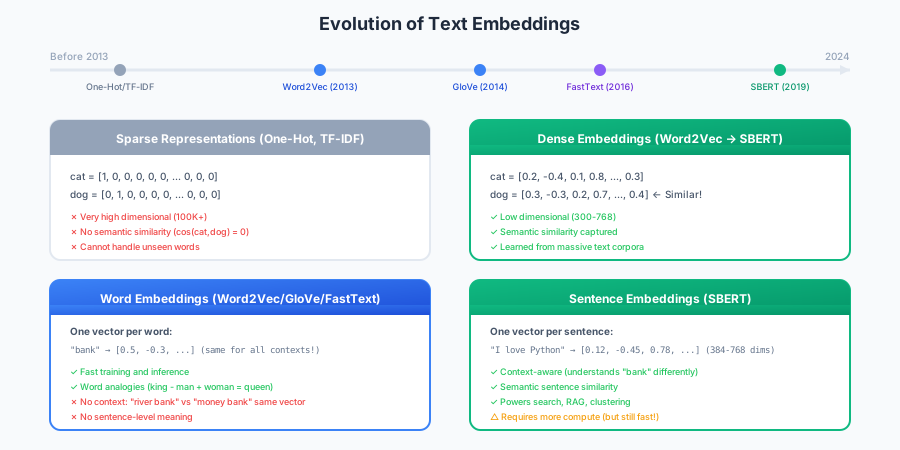
Before embeddings, text was represented using sparse methods:
One-Hot Encoding:
Vocabulary: [cat, dog, bird]
cat  = [1, 0, 0]
dog  = [0, 1, 0]
bird = [0, 0, 1]
Problems:
- Vocabulary of 100,000 words = 100,000-dimensional vectors
- No similarity: cosine(cat, dog) = 0, same as cosine(cat, quantum)
- Cannot handle words not in the vocabulary
TF-IDF:
- Weights words by importance (term frequency × inverse document frequency)
- Better than one-hot, but still high-dimensional and sparse
- Treats "happy" and "joyful" as completely unrelated
The Embedding Solution
Embeddings learn dense, low-dimensional vectors where semantically similar items cluster together:
| Word | Dense Embedding (conceptual) |
|---|---|
| cat | [0.2, -0.4, 0.1, ..., 0.8] |
| dog | [0.3, -0.3, 0.2, ..., 0.7] |
| car | [-0.5, 0.2, -0.1, ..., -0.3] |
Now cosine(cat, dog) ≈ 0.8 (similar animals), while cosine(cat, car) ≈ 0.1 (unrelated).
Word Embeddings
Word2Vec: The Pioneer (2013)
Word2Vec, from Mikolov et al. at Google, demonstrated that neural networks could learn meaningful word representations from raw text.
The Core Insight: Distributional Hypothesis
"You shall know a word by the company it keeps" - J.R. Firth (1957)
Words appearing in similar contexts have similar meanings. Word2Vec learns by predicting context:
Skip-gram (predict context from word):
Sentence: "The cat sat on the mat"
Target: "sat"
Predict: ["The", "cat", "on", "the"]

Training creates embeddings where "sat" is similar to other verbs
that appear in similar contexts ("stood", "lay", "slept")
Word Analogies
Word2Vec famously captured relationships through vector arithmetic:
king - man + woman ≈ queen
paris - france + japan ≈ tokyo
This works because relationships are encoded as directions in the vector space.
Limitations
| Limitation | Example |
|---|---|
| Static embeddings | "bank" has one vector for both "river bank" and "bank account" |
| No OOV handling | Unknown words have no representation |
| Word-level only | No sentence or document embeddings |
GloVe: Global Vectors (2014)
Stanford's GloVe takes a different approach: directly factorize the word co-occurrence matrix.
Key insight: The ratio of co-occurrence probabilities encodes meaning.
| Word k | P(k|ice) | P(k|steam) | Ratio |
|---|---|---|---|
| solid | high | low | ≫ 1 |
| gas | low | high | ≪ 1 |
| water | medium | medium | ≈ 1 |
Words related to "ice" but not "steam" have high ratios. GloVe learns embeddings that capture these ratios.
Comparison to Word2Vec:
- Similar quality for most tasks
- GloVe uses global statistics, Word2Vec uses local context windows
- Both produce static word embeddings
FastText: Subword Embeddings (2016)
Facebook's FastText represents words as bags of character n-grams.
The word "where" with n=3 becomes:
<wh, whe, her, ere, re>, <where>
Key benefits:
| Benefit | Why It Matters |
|---|---|
| OOV handling | Can generate vectors for unseen words |
| Morphology | Captures prefixes, suffixes, roots |
| Rare words | Better representations through subword sharing |
# FastText can handle words it's never seen
fasttext_model["deeplearning"]  # Works! (combines subwords)
word2vec_model["deeplearning"]  # KeyError!
Sentence Embeddings
The Context Problem
Word embeddings assign one vector per word regardless of context:
"I deposited money in the bank"  → bank = [0.5, -0.3, ...]
"I sat by the river bank"        → bank = [0.5, -0.3, ...]  # Same!
This is wrong—the meaning of "bank" depends on context.
Sentence Transformers (SBERT, 2019)
Sentence-BERT generates sentence-level embeddings that:
- Understand context within the sentence
- Can be compared with simple cosine similarity
- Are efficient enough for real-time applications
Why Not Use BERT Directly?
BERT wasn't designed for sentence similarity. Using BERT naively requires:
- Passing both sentences through BERT together
- O(n²) comparisons for n sentences
For 10,000 sentences, that's 50+ million forward passes!
SBERT generates independent embeddings: O(n) forward passes, then fast vector comparison.
Practical Usage
from sentence_transformers import SentenceTransformer
from sklearn.metrics.pairwise import cosine_similarity

model = SentenceTransformer('all-MiniLM-L6-v2')

sentences = [
    "Machine learning is a subset of AI",
    "AI systems can learn from experience",
    "The weather is nice today",
]

embeddings = model.encode(sentences)

# Similar concepts cluster together
print(cosine_similarity([embeddings[0]], [embeddings[1]]))  # ~0.75
print(cosine_similarity([embeddings[0]], [embeddings[2]]))  # ~0.15
Model Selection
| Model | Dimensions | Speed | Quality | Use Case |
|---|---|---|---|---|
all-MiniLM-L6-v2 | 384 | Fast | Good | General purpose, production |
all-mpnet-base-v2 | 768 | Medium | Best | When quality matters most |
all-MiniLM-L12-v2 | 384 | Fast | Better | Balance of speed/quality |
paraphrase-multilingual-* | 384 | Fast | Good | 50+ languages |
Rule of thumb: Start with all-MiniLM-L6-v2. Only upgrade if you need better quality and can accept slower inference.
When to Use Each Approach
Decision Framework
| Your Need | Recommended Approach |
|---|---|
| Simple word similarity | Word2Vec or GloVe |
| Handle unknown words | FastText |
| Sentence/paragraph similarity | Sentence Transformers |
| Semantic search | Sentence Transformers |
| Clustering documents | Sentence Transformers |
| Word analogies | Word2Vec |
| Very limited compute | Word2Vec (pretrained) |
Modern Default
For most NLP tasks in 2024+, start with Sentence Transformers. Only use word embeddings for specific use cases like word analogy tasks or when computational resources are extremely limited.
Practical Patterns
Semantic Search
from sentence_transformers import SentenceTransformer, util
import torch

class SemanticSearch:
    def __init__(self, model_name='all-MiniLM-L6-v2'):
        self.model = SentenceTransformer(model_name)
        self.corpus = []
        self.corpus_embeddings = None

    def index(self, documents):
        self.corpus = documents
        self.corpus_embeddings = self.model.encode(
            documents, convert_to_tensor=True
        )

    def search(self, query, top_k=5):
        query_embedding = self.model.encode(query, convert_to_tensor=True)
        scores = util.cos_sim(query_embedding, self.corpus_embeddings)[0]
        top_indices = torch.topk(scores, k=min(top_k, len(self.corpus))).indices

        return [
            {"text": self.corpus[idx], "score": scores[idx].item()}
            for idx in top_indices
        ]

# Usage
search = SemanticSearch()
search.index(["Python programming", "Machine learning basics", "Web development"])
results = search.search("How do I learn AI?")
Batch Processing
Always encode in batches for efficiency:
# Slow: one at a time
embeddings = [model.encode(s) for s in sentences]

# Fast: batch encode
embeddings = model.encode(sentences, batch_size=32)
GPU Acceleration
import torch

device = 'cuda' if torch.cuda.is_available() else 'cpu'
model = SentenceTransformer('all-MiniLM-L6-v2', device=device)
GPU acceleration provides 5-10x speedup for batch encoding.
Handling Long Documents
Models have maximum sequence lengths (typically 256-512 tokens):
| Strategy | When to Use |
|---|---|
| Truncation | Summary information is at the start |
| Chunking + averaging | Information spread throughout |
| Chunking + max pooling | Key info in specific sections |
| Long-context models | Need full document understanding |
def embed_long_document(text, model, chunk_size=256, overlap=50):
    """Embed long documents by chunking and averaging."""
    words = text.split()
    chunks = []

    for i in range(0, len(words), chunk_size - overlap):
        chunk = ' '.join(words[i:i + chunk_size])
        chunks.append(chunk)

    chunk_embeddings = model.encode(chunks)
    return chunk_embeddings.mean(axis=0)  # Average pooling
Domain Adaptation
Pre-trained models work well for general text but may underperform on specialized domains (medical, legal, financial).
When to Fine-tune
| Scenario | Action |
|---|---|
| General text, good results | Use pretrained |
| Domain terms, acceptable results | Use pretrained |
| Domain terms, poor results | Fine-tune |
| Critical accuracy needs | Fine-tune |
Fine-tuning Approaches
- Similarity pairs: Pairs of texts with similarity scores (0-1)
- Triplets: (anchor, positive, negative) examples
- Contrastive: Similar/dissimilar pairs
Typically need 1,000-10,000 examples for meaningful improvement.
Best Practices Summary
Do
- Batch encode for efficiency
- Normalize vectors before cosine similarity
- Use GPU when available
- Start with pretrained models before fine-tuning
- Test on your actual data before choosing a model
Don't
- Don't encode one sentence at a time in loops
- Don't assume pretrained models work for specialized domains
- Don't ignore sequence length limits for long documents
- Don't mix embeddings from different models in the same vector space
Conclusion
Text embeddings have evolved from sparse representations to powerful dense vectors that capture meaning:
- Word2Vec/GloVe: Pioneered dense word representations, limited by static nature
- FastText: Added subword information, handles unknown words
- Sentence Transformers: Current state-of-the-art for semantic similarity
For modern NLP applications, start with Sentence Transformers (all-MiniLM-L6-v2) and only use word embeddings for specific use cases where they excel.
References
- Mikolov et al. (2013). "Efficient Estimation of Word Representations". Word2Vec paper.
- Pennington et al. (2014). "GloVe: Global Vectors for Word Representation". GloVe paper.
- Bojanowski et al. (2017). "Enriching Word Vectors with Subword Information". FastText paper.
- Reimers & Gurevych (2019). "Sentence-BERT". SBERT paper.
- Sentence Transformers Documentation - Comprehensive library documentation.