- Published on
Structured Outputs: Getting Reliable JSON from LLMs
- Authors

- Name
- Jared Chung
Introduction
Free-form text is great for chat, but production applications need structured data. You need JSON for APIs, objects for code, and consistent formats for downstream processing.
The challenge: LLMs are trained to generate natural language, not valid JSON. Getting reliable structured outputs requires the right techniques.
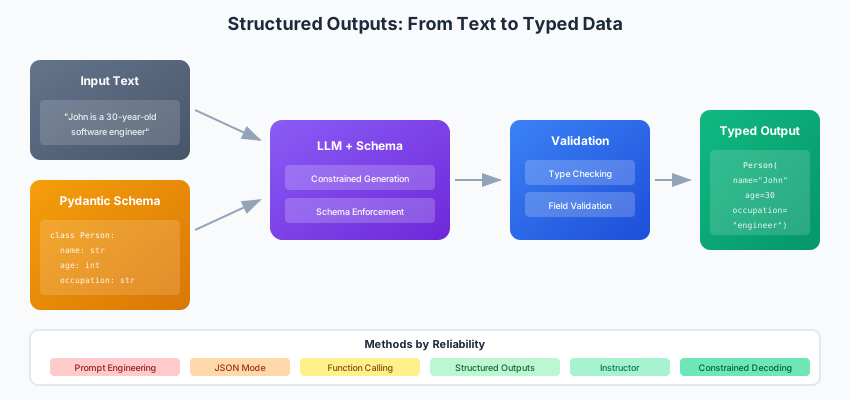
The Structured Output Spectrum
From least to most reliable:
| Method | Reliability | Flexibility | Provider Support |
|---|---|---|---|
| Prompt engineering | Low | High | All |
| JSON mode | Medium | Medium | Most |
| Function calling | High | Medium | Most |
| Structured outputs | Very High | Medium | OpenAI, Anthropic |
| Constrained decoding | Highest | Low | Outlines, LMQL |
Method 1: Prompt Engineering
The simplest approach sometimes works:
def extract_with_prompt(text: str) -> dict:
    prompt = f"""Extract the following information from the text as JSON:
    - name (string)
    - age (integer)
    - occupation (string)

    Text: {text}

    Return ONLY valid JSON, no other text:"""

    response = llm.generate(prompt)

    # Hope for the best
    return json.loads(response)
Problems:
- Model might add markdown code blocks
- Extra explanatory text
- Invalid JSON syntax
- Missing or extra fields
Method 2: JSON Mode
Most providers support a JSON mode:
OpenAI
from openai import OpenAI

client = OpenAI()

response = client.chat.completions.create(
    model="gpt-4o",
    response_format={"type": "json_object"},
    messages=[
        {"role": "system", "content": "Extract data as JSON with fields: name, age, occupation"},
        {"role": "user", "content": "John is a 30-year-old software engineer."}
    ]
)

data = json.loads(response.choices[0].message.content)
# {"name": "John", "age": 30, "occupation": "software engineer"}
Anthropic
from anthropic import Anthropic

client = Anthropic()

response = client.messages.create(
    model="claude-sonnet-4-20250514",
    max_tokens=1024,
    messages=[
        {"role": "user", "content": """Extract as JSON: {"name": str, "age": int, "occupation": str}

        Text: John is a 30-year-old software engineer.

        JSON:"""}
    ]
)

data = json.loads(response.content[0].text)
Better, but:
- Schema not enforced
- Can still get wrong types
- Might miss required fields
Method 3: Function Calling / Tool Use
Define your schema as a function:
OpenAI Function Calling
from openai import OpenAI
import json

client = OpenAI()

tools = [{
    "type": "function",
    "function": {
        "name": "extract_person",
        "description": "Extract person information from text",
        "parameters": {
            "type": "object",
            "properties": {
                "name": {"type": "string", "description": "Person's full name"},
                "age": {"type": "integer", "description": "Person's age in years"},
                "occupation": {"type": "string", "description": "Person's job title"}
            },
            "required": ["name", "age", "occupation"]
        }
    }
}]

response = client.chat.completions.create(
    model="gpt-4o",
    messages=[{"role": "user", "content": "John is a 30-year-old software engineer."}],
    tools=tools,
    tool_choice={"type": "function", "function": {"name": "extract_person"}}
)

# Parse the function call
tool_call = response.choices[0].message.tool_calls[0]
data = json.loads(tool_call.function.arguments)
Anthropic Tool Use
from anthropic import Anthropic

client = Anthropic()

tools = [{
    "name": "extract_person",
    "description": "Extract person information from text",
    "input_schema": {
        "type": "object",
        "properties": {
            "name": {"type": "string"},
            "age": {"type": "integer"},
            "occupation": {"type": "string"}
        },
        "required": ["name", "age", "occupation"]
    }
}]

response = client.messages.create(
    model="claude-sonnet-4-20250514",
    max_tokens=1024,
    tools=tools,
    messages=[{"role": "user", "content": "John is a 30-year-old software engineer."}]
)

# Find tool use block
for block in response.content:
    if block.type == "tool_use":
        data = block.input
        break
Method 4: Native Structured Outputs
The most reliable option when available.
OpenAI Structured Outputs
from openai import OpenAI
from pydantic import BaseModel

client = OpenAI()

class Person(BaseModel):
    name: str
    age: int
    occupation: str

response = client.beta.chat.completions.parse(
    model="gpt-4o-2024-08-06",
    messages=[{"role": "user", "content": "John is a 30-year-old software engineer."}],
    response_format=Person
)

person = response.choices[0].message.parsed
# Person(name='John', age=30, occupation='software engineer')
Complex Nested Schemas
from pydantic import BaseModel, Field
from typing import List, Optional
from enum import Enum

class Priority(str, Enum):
    LOW = "low"
    MEDIUM = "medium"
    HIGH = "high"

class Task(BaseModel):
    title: str
    description: str
    priority: Priority
    estimated_hours: float = Field(ge=0)

class Project(BaseModel):
    name: str
    tasks: List[Task]
    deadline: Optional[str] = None

response = client.beta.chat.completions.parse(
    model="gpt-4o",
    messages=[{
        "role": "user",
        "content": "Create a project plan for building a REST API with 3 tasks"
    }],
    response_format=Project
)

project = response.choices[0].message.parsed
for task in project.tasks:
    print(f"- {task.title} ({task.priority.value}): {task.estimated_hours}h")
Method 5: Instructor Library
Works with multiple providers:
import instructor
from openai import OpenAI
from pydantic import BaseModel

# Patch the client
client = instructor.from_openai(OpenAI())

class Person(BaseModel):
    name: str
    age: int
    occupation: str

# Automatically handles parsing and retries
person = client.chat.completions.create(
    model="gpt-4o",
    messages=[{"role": "user", "content": "John is a 30-year-old engineer."}],
    response_model=Person,
)

print(person.name)  # John
With Anthropic
import instructor
from anthropic import Anthropic

client = instructor.from_anthropic(Anthropic())

person = client.messages.create(
    model="claude-sonnet-4-20250514",
    max_tokens=1024,
    messages=[{"role": "user", "content": "John is a 30-year-old engineer."}],
    response_model=Person,
)
Retries and Validation
from pydantic import BaseModel, field_validator

class Email(BaseModel):
    subject: str
    body: str
    recipients: List[str]

    @field_validator("recipients")
    @classmethod
    def validate_emails(cls, v):
        for email in v:
            if "@" not in email:
                raise ValueError(f"Invalid email: {email}")
        return v

# Instructor automatically retries if validation fails
email = client.chat.completions.create(
    model="gpt-4o",
    messages=[{"role": "user", "content": "Draft an email to john@example.com about the meeting"}],
    response_model=Email,
    max_retries=3,  # Retry if validation fails
)
Method 6: Constrained Decoding
For maximum reliability with local models:
Outlines
import outlines

model = outlines.models.transformers("mistralai/Mistral-7B-v0.1")

# Define schema
schema = {
    "type": "object",
    "properties": {
        "name": {"type": "string"},
        "age": {"type": "integer"},
        "occupation": {"type": "string"}
    },
    "required": ["name", "age", "occupation"]
}

generator = outlines.generate.json(model, schema)

result = generator("Extract from: John is a 30-year-old engineer")
# Guaranteed valid JSON matching schema
With Pydantic
from pydantic import BaseModel
import outlines

class Person(BaseModel):
    name: str
    age: int
    occupation: str

generator = outlines.generate.json(model, Person)
person = generator("John is a 30-year-old engineer")
Handling Edge Cases
Missing Information
from pydantic import BaseModel
from typing import Optional

class Person(BaseModel):
    name: str
    age: Optional[int] = None  # Might not be mentioned
    occupation: Optional[str] = None

# Add instructions
prompt = """Extract person info. Use null for missing fields.
Text: John works in tech.
"""

# Result: Person(name='John', age=None, occupation='tech')
Ambiguous Data
from pydantic import BaseModel, Field
from typing import List

class Extraction(BaseModel):
    value: str
    confidence: float = Field(ge=0, le=1)
    alternatives: List[str] = []

class Person(BaseModel):
    name: Extraction
    age: Extraction

# Prompt for uncertainty
prompt = """Extract person info with confidence scores.
If uncertain, provide alternatives.
Text: Jon or John is around 30.
"""

# Result shows uncertainty
# Person(
#   name=Extraction(value='John', confidence=0.6, alternatives=['Jon']),
#   age=Extraction(value='30', confidence=0.8, alternatives=['29', '31'])
# )
Lists and Multiple Entities
class Person(BaseModel):
    name: str
    age: Optional[int]

class ExtractionResult(BaseModel):
    people: List[Person]

prompt = """Extract all people mentioned.
Text: John (30) and Mary work together. Bob joined recently.
"""

# Result: ExtractionResult(people=[
#   Person(name='John', age=30),
#   Person(name='Mary', age=None),
#   Person(name='Bob', age=None)
# ])
Real-World Patterns
Entity Extraction Pipeline
from pydantic import BaseModel
from typing import List, Optional
import instructor
from openai import OpenAI

client = instructor.from_openai(OpenAI())

class Entity(BaseModel):
    text: str
    type: str  # PERSON, ORG, LOCATION, etc.
    start: int
    end: int

class ExtractionResult(BaseModel):
    entities: List[Entity]
    raw_text: str

def extract_entities(text: str) -> ExtractionResult:
    return client.chat.completions.create(
        model="gpt-4o",
        messages=[
            {"role": "system", "content": """Extract named entities.
            Include character positions for each entity.
            Types: PERSON, ORG, LOCATION, DATE, MONEY"""},
            {"role": "user", "content": text}
        ],
        response_model=ExtractionResult,
    )

result = extract_entities("Apple CEO Tim Cook announced...")
for entity in result.entities:
    print(f"{entity.type}: {entity.text} [{entity.start}:{entity.end}]")
Classification with Reasoning
from enum import Enum

class Sentiment(str, Enum):
    POSITIVE = "positive"
    NEGATIVE = "negative"
    NEUTRAL = "neutral"

class Classification(BaseModel):
    sentiment: Sentiment
    confidence: float
    reasoning: str

def classify_sentiment(text: str) -> Classification:
    return client.chat.completions.create(
        model="gpt-4o",
        messages=[
            {"role": "system", "content": "Classify sentiment and explain your reasoning."},
            {"role": "user", "content": text}
        ],
        response_model=Classification,
    )

result = classify_sentiment("The product is okay but shipping was slow")
print(f"{result.sentiment.value} ({result.confidence:.0%}): {result.reasoning}")
Data Transformation
class RawRecord(BaseModel):
    text: str

class NormalizedRecord(BaseModel):
    name: str
    phone: str  # Normalized format: +1-XXX-XXX-XXXX
    email: str  # Lowercase

def normalize_contact(raw: str) -> NormalizedRecord:
    return client.chat.completions.create(
        model="gpt-4o",
        messages=[
            {"role": "system", "content": """Normalize contact information.
            Phone: +1-XXX-XXX-XXXX format
            Email: lowercase
            Name: Title Case"""},
            {"role": "user", "content": raw}
        ],
        response_model=NormalizedRecord,
    )

result = normalize_contact("JOHN DOE, john.doe@GMAIL.COM, (555) 123-4567")
# NormalizedRecord(
#   name='John Doe',
#   phone='+1-555-123-4567',
#   email='john.doe@gmail.com'
# )
Best Practices
- Use Pydantic for schemas: Type hints and validation built-in
- Make fields Optional when appropriate: Don't force hallucination
- Add Field descriptions: Helps the model understand intent
- Implement retries: Structured outputs can still fail
- Validate outputs: Don't trust, verify
- Log failures: Track which schemas cause problems
- Start simple: Add complexity only when needed
Conclusion
Structured outputs have evolved from hacky prompt engineering to first-class features. Use native structured outputs when available, Instructor for cross-provider compatibility, and constrained decoding for maximum reliability.
The key is matching your reliability requirements to the right technique and always validating the output before trusting it.