- Published on
Model Context Protocol (MCP): Standardizing AI Tool Integration
- Authors

- Name
- Jared Chung
Introduction
One of the biggest challenges in building AI applications is connecting models to the real world. Every AI system needs to access databases, APIs, file systems, and other tools but until now, every integration was custom.
The Model Context Protocol (MCP) changes this. Developed by Anthropic and released as an open standard, MCP provides a universal way for AI models to interact with external systems. Think of it as USB for AI a standard interface that works across different models and applications.
What is MCP?
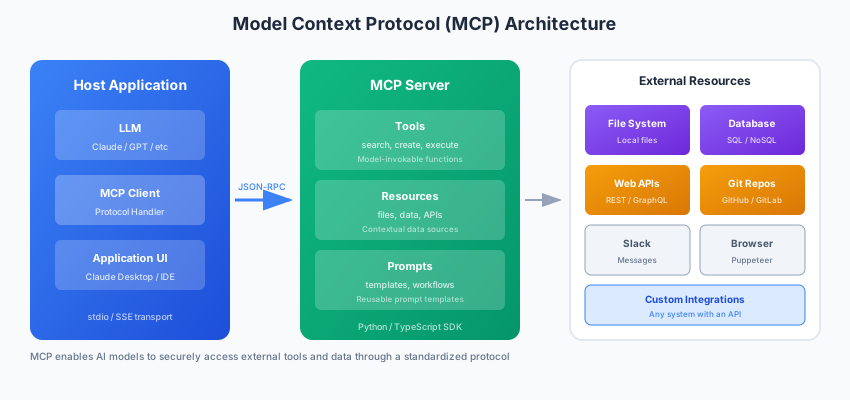
MCP is a protocol that defines how AI applications (clients) communicate with external services (servers) that provide context, tools, and capabilities.
Key components:
| Component | Description |
|---|---|
| MCP Server | Provides tools, resources, and prompts to AI clients |
| MCP Client | AI application that connects to servers |
| Tools | Functions the AI can call (like function calling) |
| Resources | Data the AI can read (files, databases, APIs) |
| Prompts | Reusable prompt templates |
Why MCP Matters
Before MCP:
- Every tool integration was custom
- Switching AI providers meant rewriting integrations
- No standard for security, permissions, or discovery
With MCP:
- Build once, use everywhere
- Standard security model
- Tool discovery and documentation built-in
- Growing ecosystem of pre-built servers
Architecture Overview
┌─────────────────┐     MCP Protocol      ┌─────────────────┐
│   AI Client     │◄────────────────────►│   MCP Server    │
│   (Claude,      │     (JSON-RPC)        │   (Your tools)  │
│    ChatGPT)     │                       │                 │
└─────────────────┘                       └─────────────────┘
                                                  │
                                                  ▼
                                          ┌─────────────────┐
                                          │ External Systems│
                                          │ (APIs, DBs,     │
                                          │  Files, etc.)   │
                                          └─────────────────┘
MCP uses JSON-RPC 2.0 over stdio or HTTP for transport.
Building Your First MCP Server
Let's build a simple MCP server that provides weather information.
Installation
pip install mcp
Basic Server Structure
# weather_server.py
from mcp.server import Server
from mcp.types import Tool, TextContent
import httpx

# Create the server
server = Server("weather-server")

# Define a tool
@server.tool()
async def get_weather(city: str) -> str:
    """Get current weather for a city.

    Args:
        city: Name of the city to get weather for
    """
    # In production, use a real weather API
    async with httpx.AsyncClient() as client:
        response = await client.get(
            f"https://wttr.in/{city}?format=j1"
        )
        data = response.json()

        current = data["current_condition"][0]
        return f"""Weather in {city}:
Temperature: {current['temp_C']}°C
Condition: {current['weatherDesc'][0]['value']}
Humidity: {current['humidity']}%
Wind: {current['windspeedKmph']} km/h"""

# Run the server
if __name__ == "__main__":
    import asyncio
    from mcp.server.stdio import stdio_server

    async def main():
        async with stdio_server() as (read_stream, write_stream):
            await server.run(
                read_stream,
                write_stream,
                server.create_initialization_options()
            )

    asyncio.run(main())
Running with Claude Desktop
Add to your Claude Desktop config (~/.config/claude/claude_desktop_config.json):
{
  "mcpServers": {
    "weather": {
      "command": "python",
      "args": ["/path/to/weather_server.py"]
    }
  }
}
Now Claude can use your weather tool directly in conversations.
More Complex Example: Database Server
A production MCP server for database access:
# database_server.py
from mcp.server import Server
from mcp.types import Tool, Resource, TextContent
import sqlite3
from pathlib import Path

server = Server("database-server")
DB_PATH = Path("./data.db")

@server.list_resources()
async def list_resources():
    """List available database tables as resources."""
    conn = sqlite3.connect(DB_PATH)
    cursor = conn.execute(
        "SELECT name FROM sqlite_master WHERE type='table'"
    )
    tables = cursor.fetchall()
    conn.close()

    return [
        Resource(
            uri=f"db://tables/{table[0]}",
            name=f"Table: {table[0]}",
            description=f"Database table {table[0]}",
            mimeType="application/json"
        )
        for table in tables
    ]

@server.read_resource()
async def read_resource(uri: str):
    """Read table schema and sample data."""
    table_name = uri.split("/")[-1]

    conn = sqlite3.connect(DB_PATH)

    # Get schema
    cursor = conn.execute(f"PRAGMA table_info({table_name})")
    columns = cursor.fetchall()

    # Get sample data
    cursor = conn.execute(f"SELECT * FROM {table_name} LIMIT 5")
    sample = cursor.fetchall()

    conn.close()

    schema = [{"name": col[1], "type": col[2]} for col in columns]

    return TextContent(
        text=f"Schema: {schema}\nSample: {sample}"
    )

@server.tool()
async def query_database(sql: str) -> str:
    """Execute a SQL query and return results.

    Args:
        sql: SQL query to execute (SELECT only for safety)

    Returns:
        Query results as formatted text
    """
    # Security: Only allow SELECT queries
    if not sql.strip().upper().startswith("SELECT"):
        return "Error: Only SELECT queries are allowed"

    try:
        conn = sqlite3.connect(DB_PATH)
        conn.row_factory = sqlite3.Row
        cursor = conn.execute(sql)
        rows = cursor.fetchall()
        conn.close()

        if not rows:
            return "No results found"

        # Format as table
        headers = rows[0].keys()
        result = " | ".join(headers) + "\n"
        result += "-" * len(result) + "\n"

        for row in rows[:100]:  # Limit results
            result += " | ".join(str(row[h]) for h in headers) + "\n"

        return result

    except Exception as e:
        return f"Query error: {str(e)}"

@server.tool()
async def get_table_stats(table_name: str) -> str:
    """Get statistics about a database table.

    Args:
        table_name: Name of the table to analyze
    """
    conn = sqlite3.connect(DB_PATH)

    # Row count
    cursor = conn.execute(f"SELECT COUNT(*) FROM {table_name}")
    count = cursor.fetchone()[0]

    # Column info
    cursor = conn.execute(f"PRAGMA table_info({table_name})")
    columns = cursor.fetchall()

    conn.close()

    stats = f"Table: {table_name}\n"
    stats += f"Rows: {count}\n"
    stats += f"Columns: {len(columns)}\n\n"
    stats += "Column Details:\n"

    for col in columns:
        stats += f"  - {col[1]} ({col[2]})\n"

    return stats
Prompts: Reusable Templates
MCP servers can also provide prompt templates:
@server.list_prompts()
async def list_prompts():
    return [
        Prompt(
            name="analyze-data",
            description="Analyze a dataset with specific focus",
            arguments=[
                PromptArgument(
                    name="focus",
                    description="What aspect to focus on",
                    required=True
                )
            ]
        )
    ]

@server.get_prompt()
async def get_prompt(name: str, arguments: dict):
    if name == "analyze-data":
        focus = arguments.get("focus", "general patterns")
        return PromptResult(
            messages=[
                PromptMessage(
                    role="user",
                    content=TextContent(
                        text=f"""Please analyze the data with a focus on {focus}.

Consider:
1. Key patterns and trends
2. Anomalies or outliers
3. Actionable insights
4. Potential issues or data quality concerns

Provide a structured analysis with clear sections."""
                    )
                )
            ]
        )
Security Considerations
MCP servers have significant power. Implement proper security:
Input Validation
from pydantic import BaseModel, validator

class QueryInput(BaseModel):
    sql: str

    @validator("sql")
    def validate_sql(cls, v):
        # Prevent dangerous operations
        dangerous = ["DROP", "DELETE", "UPDATE", "INSERT", "ALTER", "CREATE"]
        if any(word in v.upper() for word in dangerous):
            raise ValueError("Only SELECT queries allowed")
        return v

@server.tool()
async def safe_query(query: QueryInput) -> str:
    # Input is validated by Pydantic
    return execute_query(query.sql)
Rate Limiting
from datetime import datetime, timedelta
from collections import defaultdict

class RateLimiter:
    def __init__(self, max_requests: int, window_seconds: int):
        self.max_requests = max_requests
        self.window = timedelta(seconds=window_seconds)
        self.requests = defaultdict(list)

    def is_allowed(self, key: str) -> bool:
        now = datetime.now()
        cutoff = now - self.window

        # Clean old requests
        self.requests[key] = [
            t for t in self.requests[key] if t > cutoff
        ]

        if len(self.requests[key]) >= self.max_requests:
            return False

        self.requests[key].append(now)
        return True

limiter = RateLimiter(max_requests=100, window_seconds=60)

@server.tool()
async def rate_limited_tool(input: str) -> str:
    if not limiter.is_allowed("default"):
        return "Rate limit exceeded. Please wait."
    # Process request
Permission Scoping
from enum import Enum

class Permission(Enum):
    READ = "read"
    WRITE = "write"
    ADMIN = "admin"

class PermissionManager:
    def __init__(self):
        self.permissions = {
            "read_data": Permission.READ,
            "query_database": Permission.READ,
            "modify_data": Permission.WRITE,
            "delete_data": Permission.ADMIN,
        }

    def check(self, tool_name: str, user_permission: Permission) -> bool:
        required = self.permissions.get(tool_name, Permission.ADMIN)
        return user_permission.value >= required.value
Testing MCP Servers
# test_weather_server.py
import pytest
from mcp.client import ClientSession
from mcp.client.stdio import stdio_client

@pytest.fixture
async def client():
    async with stdio_client(
        command="python",
        args=["weather_server.py"]
    ) as (read, write):
        async with ClientSession(read, write) as session:
            await session.initialize()
            yield session

@pytest.mark.asyncio
async def test_list_tools(client):
    tools = await client.list_tools()
    assert any(t.name == "get_weather" for t in tools)

@pytest.mark.asyncio
async def test_get_weather(client):
    result = await client.call_tool("get_weather", {"city": "London"})
    assert "Temperature" in result.content[0].text
Ecosystem and Pre-built Servers
The MCP ecosystem is growing rapidly:
Official servers:
@modelcontextprotocol/server-filesystem- File system access@modelcontextprotocol/server-github- GitHub integration@modelcontextprotocol/server-slack- Slack integration@modelcontextprotocol/server-postgres- PostgreSQL access
Community servers:
- Browser automation
- Email clients
- Calendar integration
- Various SaaS APIs
Install and use:
{
  "mcpServers": {
    "filesystem": {
      "command": "npx",
      "args": ["@modelcontextprotocol/server-filesystem", "/path/to/allowed/directory"]
    }
  }
}
Building MCP Clients
If you're building an AI application, you can be an MCP client:
from mcp.client import ClientSession
from mcp.client.stdio import stdio_client

async def use_mcp_tools():
    # Connect to MCP server
    async with stdio_client(
        command="python",
        args=["my_server.py"]
    ) as (read, write):
        async with ClientSession(read, write) as session:
            # Initialize connection
            await session.initialize()

            # Discover available tools
            tools = await session.list_tools()
            print(f"Available tools: {[t.name for t in tools]}")

            # Call a tool
            result = await session.call_tool(
                "get_weather",
                {"city": "Tokyo"}
            )
            print(result.content[0].text)

            # Read a resource
            resources = await session.list_resources()
            if resources:
                content = await session.read_resource(resources[0].uri)
                print(content)
Best Practices
- Clear tool descriptions: The AI uses these to decide when to call tools
- Validate all inputs: Never trust input from the AI
- Limit scope: Only expose what's necessary
- Handle errors gracefully: Return helpful error messages
- Log everything: Debugging AI tool calls is hard without logs
- Version your servers: Use semantic versioning for breaking changes
Conclusion
MCP represents a significant step toward standardized AI tooling. By adopting MCP, you get interoperability across AI systems, a growing ecosystem of pre-built integrations, and a security model designed for AI workloads.
Whether you're building tools for Claude, creating a custom AI application, or contributing to the ecosystem, MCP provides the foundation for reliable AI-to-world integration.