- Published on
LangChain and LlamaIndex: Building LLM Applications
- Authors

- Name
- Jared Chung
Introduction
Building LLM applications from scratch requires implementing chains, memory, document loading, vector storage, and more. LangChain and LlamaIndex are frameworks that provide these building blocks, saving weeks of development time.
But which should you use? They overlap significantly but have different philosophies:
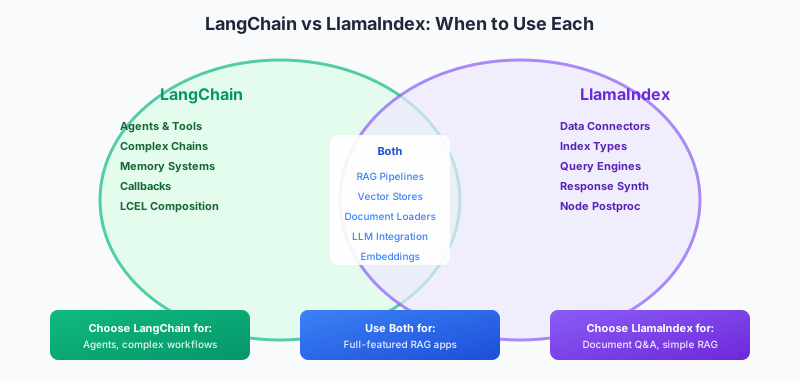
- LangChain is a general-purpose orchestration framework for any LLM workflow
- LlamaIndex is focused specifically on connecting LLMs with your data
This guide helps you understand both frameworks and choose the right one for your project.
Understanding the Frameworks
LangChain: The Swiss Army Knife
LangChain's philosophy is flexibility. It provides primitives for:
- Models: Unified interface to any LLM (OpenAI, Anthropic, local models)
- Prompts: Template management and composition
- Chains: Sequences of operations
- Memory: Conversation history management
- Agents: LLMs that can use tools and make decisions
- Callbacks: Logging, streaming, and monitoring
The learning curve is steeper because there's more to learn, but you can build anything.
LlamaIndex: The Data Expert
LlamaIndex's philosophy is simplicity for data-centric applications. It excels at:
- Data Connectors: Load from 160+ sources (Notion, Slack, databases, etc.)
- Index Structures: Different ways to organize data for retrieval
- Query Engines: Sophisticated retrieval and response synthesis
- Node Processing: Transform and filter retrieved content
For RAG applications, LlamaIndex often requires less code.
When to Use Each
| Use Case | Recommended | Why |
|---|---|---|
| Simple Q&A over documents | LlamaIndex | Purpose-built, less code |
| Complex multi-step agents | LangChain | Better agent framework |
| Chatbot with memory | LangChain | Robust memory options |
| Multiple data sources | LlamaIndex | 160+ connectors |
| Custom LLM workflows | LangChain | LCEL composition |
| Production RAG | Both | Use together for full power |
Core Concepts
LangChain Expression Language (LCEL)
LCEL is LangChain's declarative way to compose chains using the pipe operator:
from langchain_openai import ChatOpenAI
from langchain_core.prompts import ChatPromptTemplate
from langchain_core.output_parsers import StrOutputParser

# Create components
prompt = ChatPromptTemplate.from_template("Explain {topic} simply")
model = ChatOpenAI(model="gpt-4o-mini")
parser = StrOutputParser()

# Compose with pipe operator
chain = prompt | model | parser

# Run
result = chain.invoke({"topic": "quantum computing"})
The chain flows left to right: prompt formats the input → model generates → parser extracts text.
Why LCEL?
- Automatic streaming support
- Parallel execution where possible
- Built-in retry logic
- Easy debugging with intermediate values
LlamaIndex Query Pipeline
LlamaIndex has a similar concept with query pipelines:
from llama_index.core import VectorStoreIndex, SimpleDirectoryReader
from llama_index.core.query_pipeline import QueryPipeline

# Load and index documents
documents = SimpleDirectoryReader("data").load_data()
index = VectorStoreIndex.from_documents(documents)

# Create query engine
query_engine = index.as_query_engine()

# Query
response = query_engine.query("What is the main topic?")
LlamaIndex's approach is more opinionated—it handles more automatically but gives less control.
Building a RAG Application
Let's compare implementing the same RAG system in both frameworks.
LangChain RAG
from langchain_openai import ChatOpenAI, OpenAIEmbeddings
from langchain_community.vectorstores import Chroma
from langchain_community.document_loaders import PyPDFLoader
from langchain.text_splitter import RecursiveCharacterTextSplitter
from langchain_core.prompts import ChatPromptTemplate
from langchain_core.runnables import RunnablePassthrough

# 1. Load documents
loader = PyPDFLoader("document.pdf")
docs = loader.load()

# 2. Split into chunks
splitter = RecursiveCharacterTextSplitter(chunk_size=1000, chunk_overlap=200)
chunks = splitter.split_documents(docs)

# 3. Create vector store
vectorstore = Chroma.from_documents(chunks, OpenAIEmbeddings())
retriever = vectorstore.as_retriever(search_kwargs={"k": 5})

# 4. Create chain
template = """Answer based on this context:
{context}

Question: {question}"""

prompt = ChatPromptTemplate.from_template(template)
model = ChatOpenAI(model="gpt-4o-mini")

chain = (
    {"context": retriever, "question": RunnablePassthrough()}
    | prompt
    | model
)

# 5. Query
response = chain.invoke("What are the key findings?")
LlamaIndex RAG
from llama_index.core import VectorStoreIndex, SimpleDirectoryReader
from llama_index.core import Settings
from llama_index.llms.openai import OpenAI

# 1. Configure (optional)
Settings.llm = OpenAI(model="gpt-4o-mini")

# 2. Load and index (handles chunking automatically)
documents = SimpleDirectoryReader("data").load_data()
index = VectorStoreIndex.from_documents(documents)

# 3. Create query engine
query_engine = index.as_query_engine(similarity_top_k=5)

# 4. Query
response = query_engine.query("What are the key findings?")
Comparison:
- LlamaIndex: ~10 lines, automatic chunking
- LangChain: ~25 lines, explicit control over each step
For simple RAG, LlamaIndex is faster to implement. For customization (custom chunking, hybrid search, reranking), LangChain gives more control.
Key Features Deep Dive
Agents: LangChain's Strength
Agents are LLMs that can decide which tools to use and in what order:
from langchain_openai import ChatOpenAI
from langchain.agents import tool, AgentExecutor, create_openai_functions_agent
from langchain_core.prompts import ChatPromptTemplate, MessagesPlaceholder

# Define tools
@tool
def search_database(query: str) -> str:
    """Search the product database."""
    return f"Found 3 products matching '{query}'"

@tool
def get_weather(city: str) -> str:
    """Get current weather for a city."""
    return f"Weather in {city}: 72°F, sunny"

# Create agent
llm = ChatOpenAI(model="gpt-4o-mini")
tools = [search_database, get_weather]

prompt = ChatPromptTemplate.from_messages([
    ("system", "You are a helpful assistant."),
    ("human", "{input}"),
    MessagesPlaceholder("agent_scratchpad"),
])

agent = create_openai_functions_agent(llm, tools, prompt)
executor = AgentExecutor(agent=agent, tools=tools)

# The agent decides which tools to use
result = executor.invoke({"input": "What products match 'laptop'?"})
The agent autonomously:
- Understands the user's intent
- Decides to call
search_database - Formats and returns the response
Data Connectors: LlamaIndex's Strength
LlamaIndex has connectors for virtually any data source:
from llama_index.readers.notion import NotionPageReader
from llama_index.readers.slack import SlackReader
from llama_index.readers.database import DatabaseReader

# From Notion
notion_loader = NotionPageReader(integration_token="secret_...")
notion_docs = notion_loader.load_data(page_ids=["page_id"])

# From Slack
slack_loader = SlackReader(slack_token="xoxb-...")
slack_docs = slack_loader.load_data(channel_ids=["C12345"])

# From SQL database
db_loader = DatabaseReader(uri="postgresql://...")
db_docs = db_loader.load_data(query="SELECT * FROM articles")

# Combine all sources into one index
from llama_index.core import VectorStoreIndex
all_docs = notion_docs + slack_docs + db_docs
index = VectorStoreIndex.from_documents(all_docs)
Memory: Conversation History
Both frameworks handle conversation memory differently.
LangChain:
from langchain_core.chat_history import InMemoryChatMessageHistory
from langchain_core.runnables.history import RunnableWithMessageHistory

store = {}

def get_session_history(session_id: str):
    if session_id not in store:
        store[session_id] = InMemoryChatMessageHistory()
    return store[session_id]

chain_with_memory = RunnableWithMessageHistory(
    chain,
    get_session_history,
    input_messages_key="input",
    history_messages_key="history",
)
LlamaIndex:
from llama_index.core.memory import ChatMemoryBuffer

memory = ChatMemoryBuffer.from_defaults(token_limit=3000)
chat_engine = index.as_chat_engine(memory=memory)

# Maintains context across calls
response1 = chat_engine.chat("What is the document about?")
response2 = chat_engine.chat("Can you elaborate on that?")  # Remembers context
Choosing the Right Framework
Start with LlamaIndex if:
- Your primary use case is RAG - Purpose-built with sensible defaults
- You're connecting multiple data sources - Extensive connector library
- You want to move fast - Less configuration needed
- The team is new to LLM apps - Gentler learning curve
Start with LangChain if:
- You need agents with tools - Best-in-class agent framework
- You have complex workflows - LCEL enables sophisticated composition
- You need fine-grained control - Explicit control over every step
- You're building beyond RAG - More general-purpose
Use Both Together
For production applications, the frameworks complement each other:
# Use LlamaIndex for data loading and indexing
from llama_index.core import VectorStoreIndex, SimpleDirectoryReader
documents = SimpleDirectoryReader("data").load_data()
index = VectorStoreIndex.from_documents(documents)

# Export to LangChain for complex chains
from llama_index.core.langchain_helpers.text_splitter import LangchainNodeParser
from langchain_community.vectorstores import Chroma

# Use LlamaIndex's data, LangChain's orchestration
# Best of both worlds
Common Patterns
Hybrid Search
Both frameworks support combining vector and keyword search:
# LangChain
from langchain.retrievers import EnsembleRetriever
from langchain_community.retrievers import BM25Retriever

bm25 = BM25Retriever.from_documents(docs)
vector = vectorstore.as_retriever()
hybrid = EnsembleRetriever(retrievers=[bm25, vector], weights=[0.5, 0.5])
Structured Output
Enforce output schemas:
# LangChain
from pydantic import BaseModel

class Summary(BaseModel):
    title: str
    key_points: list[str]
    sentiment: str

structured_llm = llm.with_structured_output(Summary)
result = structured_llm.invoke("Summarize: ...")  # Returns Summary object
Streaming
Stream responses for better UX:
# LangChain
for chunk in chain.stream({"question": "Explain AI"}):
    print(chunk, end="", flush=True)

# LlamaIndex
response = query_engine.query("Explain AI")
for token in response.response_gen:
    print(token, end="", flush=True)
Conclusion
Both LangChain and LlamaIndex are excellent frameworks that will accelerate your LLM development:
LlamaIndex gets you to a working RAG system faster with less code. Start here if document Q&A is your primary use case.
LangChain gives you more control and flexibility for complex applications. Start here if you need agents, complex chains, or highly customized workflows.
For production applications, consider using both—LlamaIndex for data handling, LangChain for orchestration. They integrate well together.
The best framework is the one that matches your use case and team experience. Start with the simpler option (usually LlamaIndex for RAG) and add complexity only when needed.
References
- LangChain Documentation - Official docs and tutorials.
- LlamaIndex Documentation - Official docs and guides.
- LangChain Expression Language - LCEL guide.
- LlamaIndex Hub - Data loaders and tools.
- Comparison Blog Post - Official comparison from LlamaIndex.